CRM & automation
Missed calls are lost jobs: setting up text-back
When you can’t answer, most callers don’t leave a voicemail. They call the next company. Missed-call text-back keeps the conversation going in seconds.
 LeadsGeeks Team3 min read
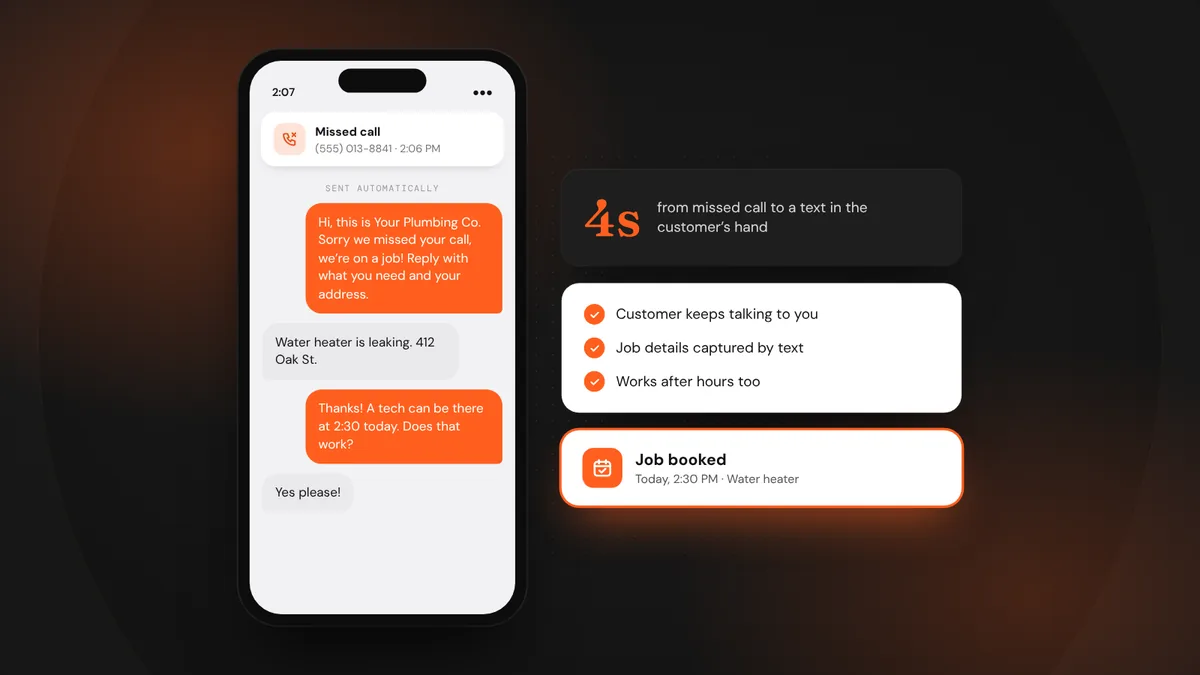
You’re on a roof, under a sink or driving between jobs, and the phone rings. By the time you call back, the customer has already booked someone else. For most local service businesses, missed calls are the biggest leak in the whole pipeline, and one of the easiest to fix.
- Missed-call text-back sends an automatic text within seconds of a call you can’t answer.
- It keeps the customer talking to you instead of dialing the next company.
- Setup takes an afternoon. You need a business texting number, consent and a few good messages.
What missed-call text-back is
When a call to your business number goes unanswered, your phone system or CRM automatically texts the caller, usually within a few seconds. The text acknowledges the call, says you’ll call back soon, and invites them to reply with what they need. Many customers prefer texting anyway. Now they’re in a conversation with you, not scrolling for another number.
Why it works
- Speed. The text arrives while they’re still holding the phone, before they call anyone else.
- It shows you’re real and responsive. An instant reply signals a business that takes calls seriously.
- It captures the job details. Customers often reply with the problem, the address and photos, so your callback is faster.
- It works after hours. Calls at 9 p.m. get an answer and a plan instead of silence.
Messages that work
Hi, this is {business}. Sorry we missed your call. We’re probably on a job! Reply here with what you need and your address, and we’ll get right back to you. Need us urgently? Reply URGENT.
Thanks for calling {business}. We’re closed right now but we’ll call you first thing at {open time}. If it’s an emergency, reply EMERGENCY and our on-call tech will reach out.
Hi again from {business}. Still need help with your {service}? We have openings {today/tomorrow}. Just reply here or call back at {number}.
How to set it up
- Use a phone system or CRM that supports it.Most modern business phone systems and CRMs, including GoHighLevel, offer missed-call text-back. You’ll usually keep your existing number by forwarding it or porting it.
- Register for business texting.In the U.S., carriers require business numbers that send texts to be registered (called A2P 10DLC registration). Unregistered numbers get filtered or blocked. Your provider walks you through it.
- Write your messages.Separate messages for business hours and after hours, plus one follow-up. Use the templates above as a start.
- Route replies to a person.Make sure replies land somewhere someone checks: a shared inbox, the office manager’s phone or your CRM app with notifications on.
- Test it.Call your number from a personal phone, let it ring out, and check the text arrives within seconds and looks right.
Stay on the right side of the rules
Replying to someone who just called you is generally fine, but keep these in mind: identify your business in every text, honor STOP requests immediately, don’t add callers to marketing campaigns without clear permission, and keep message frequency low. When in doubt, ask your provider about consent requirements in your state.
Measure what it saves
Track how many missed calls get a text, how many reply, and how many become booked jobs. Most businesses are surprised by the first month’s numbers. It’s often the clearest proof that the system pays for itself.
Frequently asked questions
Will customers be annoyed by an automatic text?
Most aren’t. They called because they wanted help, and a quick reply is better than silence. Keep the message short, clearly from your business, and easy to reply to.
Can I keep my existing business number?
Usually, yes. Most systems let you forward your current number or port it over, so customers keep calling the number they already know.
What is A2P 10DLC registration?
It’s the U.S. carrier registration for businesses sending texts from regular 10-digit numbers. Registering tells carriers who you are and what you send, so your texts aren’t filtered as spam.
LeadsGeeks TeamWe build search, review and follow-up systems for local service businesses: the pages, profiles and automations that turn searches into booked jobs. CRM & automationQuote follow-up sequences that don’t feel pushy
 CRM & automationSpeed to lead: answer new leads in minutes, not hours
 AI searchWhat AI search readiness means for a local service business