Reviews
The review request playbook: when and how to ask
Most happy customers will leave a review. They just need to be asked at the right moment, in the right way. Here’s the timing, the wording and the system.
 LeadsGeeks Team3 min read
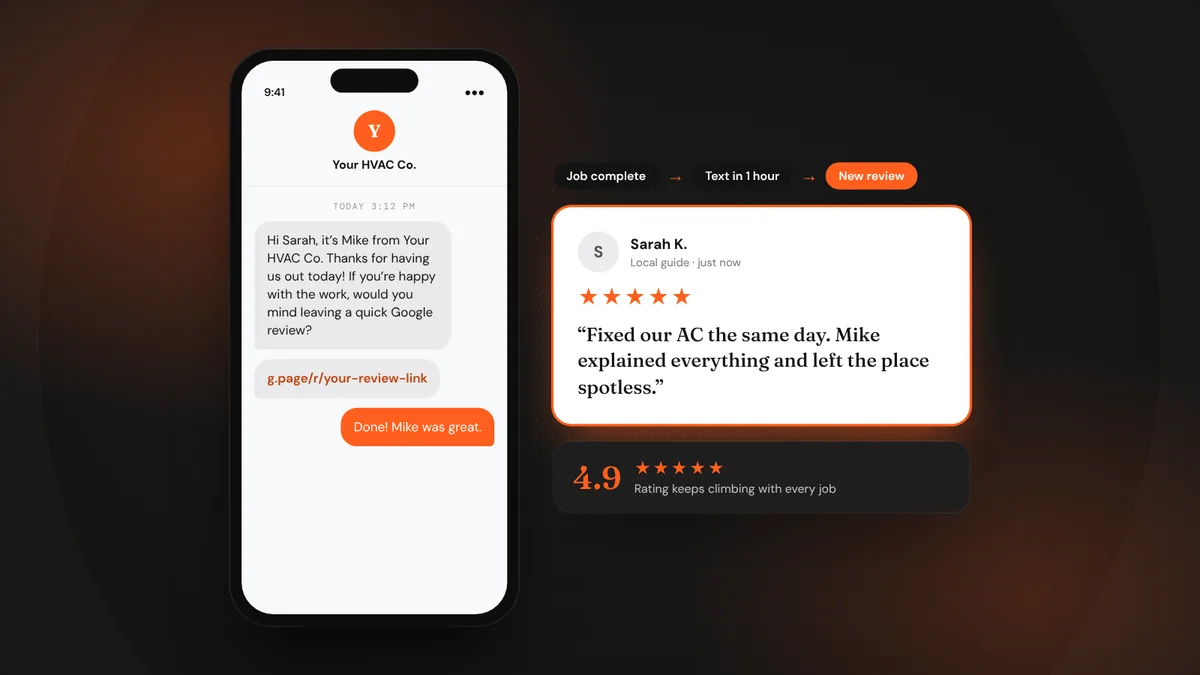
Ask any local business owner why they don’t have more reviews and you’ll hear the same thing: “We forget to ask.” Customers who just had a great experience are usually glad to help. The gap is a reliable moment and an easy link.
- Ask within an hour of finishing the job, while the result is fresh.
- Text beats email. Keep it short, personal and one tap to the review page.
- Ask every customer the same way. Never filter, reward or script reviews.
When to ask
The best time is right after the customer sees the result: the AC is blowing cold, the drain is clear, the car is spotless. Gratitude fades fast. A request sent the same day gets far more responses than one sent a week later.
- Same-day jobs: send the request as the tech leaves, or within the hour.
- Multi-day projects: ask at the final walkthrough, then follow up by text that evening.
- Recurring services: ask after the second or third visit, once trust is built.
How to ask
In person first, then by text. A tech saying, “If you’re happy with how this went, it really helps us if you leave a quick review, I’ll text you the link,” works better than any email. Then send the text so the link is right there.
Hi {first name}, it’s {tech name} from {business}. Thanks for having us out today! If you’re happy with the work, would you mind leaving us a quick Google review? It really helps a small local business. {review link}
Hi {first name}, it was great working on your {project} with you. If you have a minute, a Google review about your experience would mean a lot to our crew: {review link}. Thank you!
Hi {first name}, just a quick reminder in case it got buried. Here’s the review link if you have a moment: {review link}. Thanks again for choosing {business}.
Make it one tap
Get your direct review link from your Google Business Profile (look for “Ask for reviews” or “Get more reviews”). It opens the review box straight away, so there’s no searching. Shorten it if you like, and use the same link everywhere: texts, emails, invoices, a QR code on the leave-behind card.
The rules you can’t break
Google’s policies and the FTC’s rule on consumer reviews and testimonials are clear on a few points:
- Don’t gate reviews. Don’t ask “Were you happy?” and only send the link to people who say yes. Ask everyone.
- Don’t pay for reviews. No discounts, gift cards or entries into a drawing in exchange for a review.
- Don’t write them for customers or post reviews from staff, family or friends.
- Don’t ask in bulk from a single location, like a tablet at your counter. Google may filter those reviews.
Turn it into a system
Relying on techs to remember means it won’t happen consistently. Connect your job management software or CRM so a review request goes out automatically when a job is marked complete, with one reminder if they don’t respond. Then it happens on every job, including the busy days when nobody would remember.
- Job marked completeYour field software or CRM triggers the request automatically.
- Text sent within the hourPersonal, short, from your business number, with the direct link.
- One reminder after 2–3 daysOnly if they haven’t left a review. Never more than one.
- Reply to every reviewThank them by name and mention the service. It shows future customers you care.
Frequently asked questions
Is it okay to ask for reviews by text?
Yes, if the customer gave you their number for the job and you identify your business. Keep it to one request and one reminder, and honor STOP replies.
Should I ask customers to mention specific things?
You can suggest they mention the service and what stood out, but never tell them what to say or offer anything in return. Real, unscripted reviews carry the most weight.
What if a customer leaves a review on Yelp or Facebook instead?
That’s fine. Reviews anywhere help. Focus your requests on Google, where most local customers look first, and reply to reviews on every platform.
LeadsGeeks TeamWe build search, review and follow-up systems for local service businesses: the pages, profiles and automations that turn searches into booked jobs. ReviewsHow to reply to a negative review (with examples)
 ReviewsPut your reviews to work on your website and quotes
 AI searchWhat AI search readiness means for a local service business