AI search
How to write FAQ answers AI assistants can quote
AI assistants pull short, plain answers from the web. Here’s how to turn the questions you hear every day into answers they can use, and customers can trust.
 LeadsGeeks Team3 min read
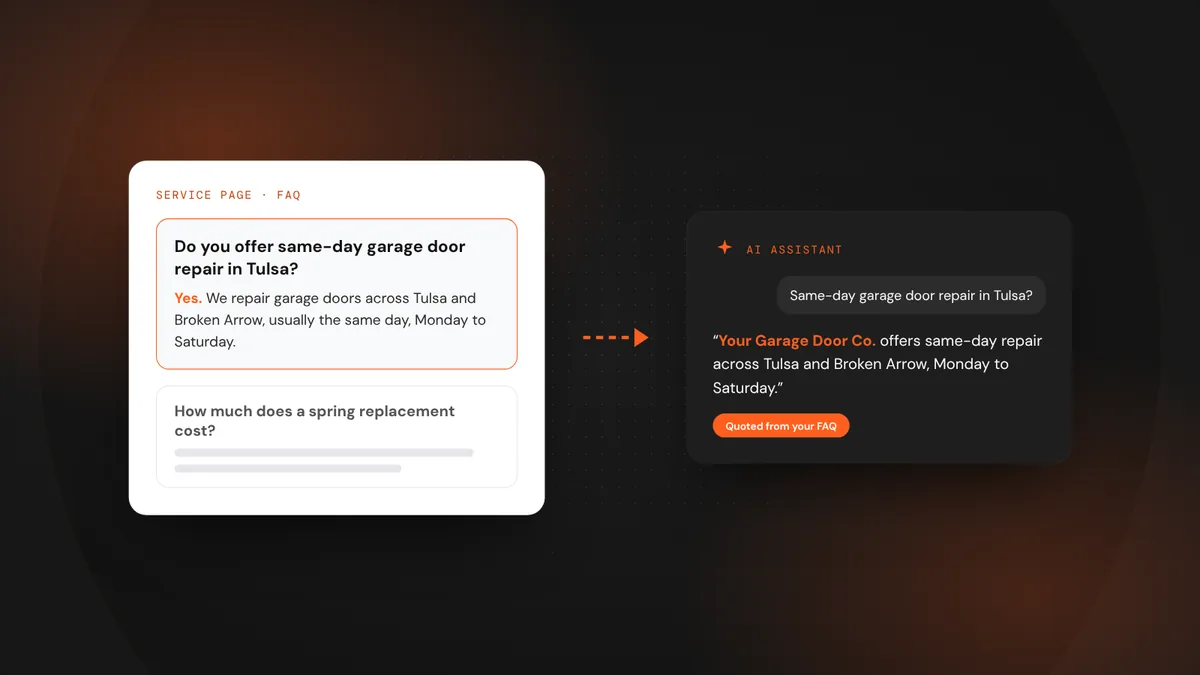
When someone asks an assistant “how much does a water heater replacement cost in Plano?” or “does anyone in Tulsa do same-day garage door repair?”, it looks for a clear, specific answer it can repeat. The businesses that have written those answers down, plainly and on their own website, are the ones that get mentioned.
- Start from the questions customers already ask on the phone.
- Answer in the first sentence, then add the detail.
- Be specific about your services, towns, timing and price ranges, and keep it honest.
Why FAQ answers matter for AI search
Assistants summarize what they can find and verify. A page that says “we offer quality service” gives them nothing to work with. A short answer that says “Yes, we do same-day garage door repair across Tulsa and Broken Arrow, Monday to Saturday” is something they can quote, and something a customer can act on.
Good FAQ answers also help on Google itself. They answer the question before the customer has to call, which builds trust, and they give search engines more clear text about what you do and where.
Find the questions worth answering
How to write an answer that gets used
- Lead with the answer.Start with “Yes,” “No,” a price range or a time frame. The first sentence should work on its own if it’s the only thing quoted.
- Name the service and the place.“We replace tankless water heaters in Plano, Frisco and Allen” beats “we serve the area.”
- Give a real range, not a promise.If prices vary, say what they usually fall between and what changes the price. Never publish a number you don’t honor.
- Keep it short.Two to four sentences is plenty. Link to the full service page for more.
- Keep it current.Update answers when your prices, hours or service area change. Outdated answers are worse than none.
Q: Do you offer [service] in [town]? A: Yes. We offer [service] across [town], [town] and [town], usually within [time frame]. Most jobs cost between $[low] and $[high], depending on [main factor]. Call or request a quote and we’ll confirm the price before we start.
Where to put your answers
- On each service page, with three to five questions about that service.
- On a general FAQ page for questions about booking, payment, warranty and service area.
- In your Google Business Profile Q&A, where customers can see them on the map listing.
- Marked up with FAQ structured data, so the questions and answers are easy for machines to read.
FAQ answers are one of the simplest ways to become easier to recommend. They take an afternoon to write, they help customers decide, and they give AI assistants the clear facts they need to name you.
Frequently asked questions
How many FAQs should a service page have?
Three to five focused questions is a good range. Enough to cover the real worries about that service, without burying the page in text.
Should I publish prices in my FAQs?
If you can give an honest range, yes. A range with what changes the price builds trust. If every job is truly different, explain how you quote instead.
Does FAQ schema still matter?
It no longer guarantees special results on Google, but it still helps machines read your questions and answers clearly, and it’s quick to add.
LeadsGeeks TeamWe build search, review and follow-up systems for local service businesses: the pages, profiles and automations that turn searches into booked jobs. AI searchWhat AI search readiness means for a local service business
 AI searchHow AI assistants decide which local businesses to recommend
 Local SEOHow to win the Google map pack in your service area