Local SEO
How to win the Google map pack in your service area
The three businesses in Google’s map pack get most of the calls. Here’s how Google picks them, and the work that moves you into one of those spots.
 LeadsGeeks Team4 min read
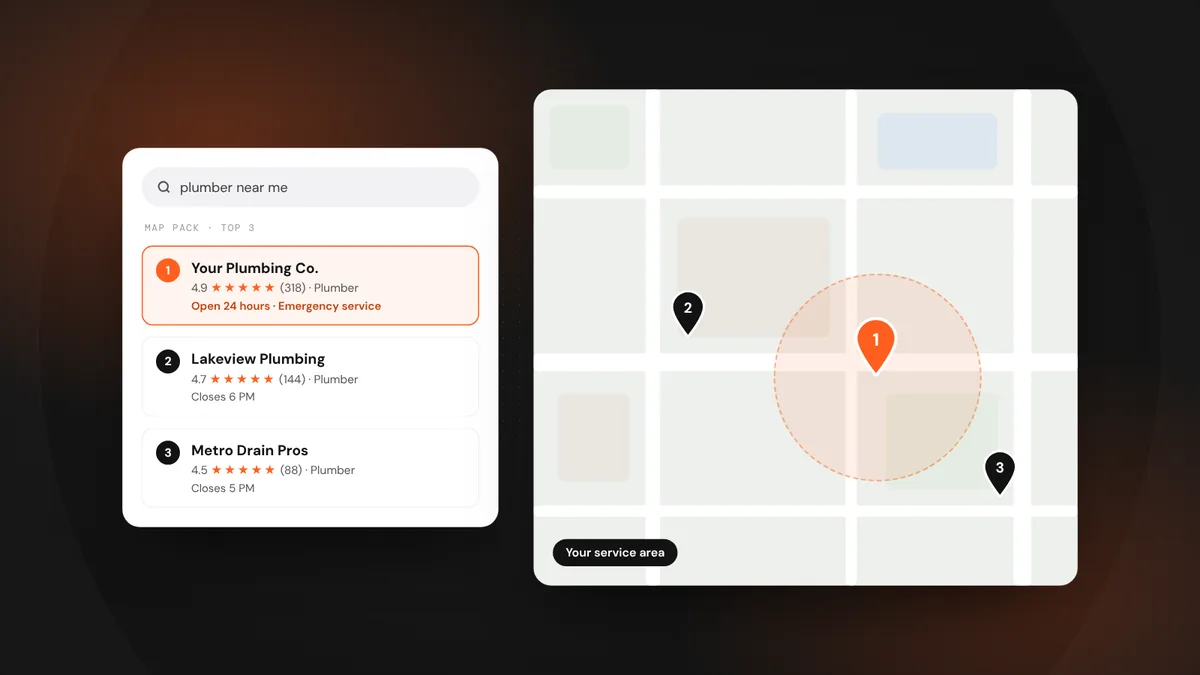
Search “plumber near me” and the first thing you see isn’t a website. It’s a map with three businesses under it. That block, the map pack, is where most local service calls start. Getting into it is less about tricks and more about doing a handful of things thoroughly and consistently.
- Google ranks the map pack on three things: relevance, distance and prominence.
- You can’t move your address, but you can control relevance and prominence.
- A complete profile, real photos, steady reviews and strong local pages do most of the work.
How Google chooses the three
Google says local results are based mainly on three factors:
Distance is why a business two miles away can outrank a better one ten miles away. It’s also why your rank changes from street to street. The goal isn’t to be first everywhere. It’s to be in the top three across as much of your service area as possible.
Build a profile Google can’t ignore
- Pick the right primary category.Your primary category is the single biggest relevance signal. “Plumber” is not the same as “Drainage service.” Choose the one that matches the jobs you want most, then add secondary categories for the rest.
- List every service.Add each service you offer in the Services section, with a short description. Searches for “tankless water heater install” look for that exact service.
- Set your service area honestly.If you go to customers, hide your address and list the cities or ZIP codes you actually serve. Overreaching rarely helps and can get the profile flagged.
- Fill in everything else.Hours, holiday hours, phone, website, booking link, attributes like “Online estimates” or “Veteran-owned,” and an opening date. Empty fields are missed chances.
- Post real photos every week.Before-and-afters, your trucks, your team on jobs. Photos taken on site, by your crew, beat stock images every time.
Reviews: the prominence engine
Reviews are where most map pack battles are won. Google looks at how many you have, how recent they are, your average rating and whether you reply. Reviews that mention the service and the town (“fixed our AC in Frisco same day”) also add relevance.
- Ask every happy customer, every time, ideally by text within an hour of finishing.
- Reply to every review, good or bad, within a couple of days.
- Never buy reviews, offer rewards for good ones, or only ask customers you think are happy. All three break Google’s rules and U.S. federal rules on reviews.
Your website still matters
Your profile links to your website, and Google uses that site to confirm what you do and where. A strong site has a page for each main service and each main town, your name, address and phone in the footer, and reviews or photos that prove you work in the area. If your site is a single page that says “We do it all,” it’s holding your profile back.
Consistency across the web
Make sure your business name, address and phone number are identical on Google, Apple Maps, Bing, Yelp, Facebook, the BBB and the main directories for your trade. Mismatches confuse Google about which details are right, and confusion costs rank.
How to track progress
Check Google Business Profile Performance each month for calls, direction requests and website clicks. To see where you rank across your area, use a grid rank tracker, which checks your position from dozens of points on a map. Expect steady movement over two to three months, not overnight jumps.
Frequently asked questions
How long does it take to get into the map pack?
For most local service businesses, steady work on the profile, reviews and website shows movement within two to three months. Very competitive trades in big cities can take longer.
Does posting on Google Business Profile help ranking?
Posts mainly help customers who view your profile, by showing you’re active and sharing offers. Photos, reviews, categories and services have a bigger effect on where you rank.
Can I rank in a city where I don’t have an office?
You can show up for searches in nearby areas, especially with strong reviews and service-area pages, but distance still matters. Never create a fake address to appear in another city; it can get your profile suspended.
LeadsGeeks TeamWe build search, review and follow-up systems for local service businesses: the pages, profiles and automations that turn searches into booked jobs. Local SEOService-area pages that rank, without reading like spam
 Local SEOLocal listings: get your business details right everywhere
 AI searchWhat AI search readiness means for a local service business