Local SEO
Service-area pages that rank, without reading like spam
Pages for each town you serve can bring in steady local calls, if they’re genuinely useful. Here’s how to write them so Google and customers both trust them.
 LeadsGeeks Team3 min read
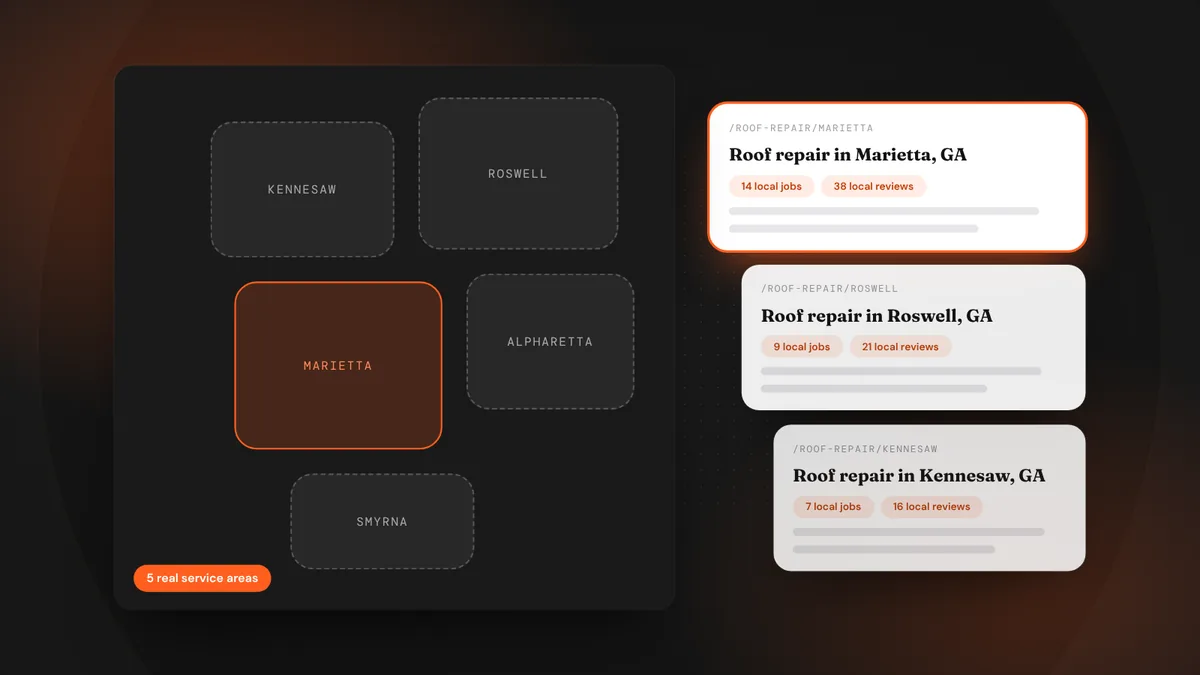
If you serve a dozen towns, you want to show up when someone in each of them searches. Service-area pages, one page per town or region, are how you do it. But copy-and-paste pages with the town name swapped out don’t rank for long, and customers can smell them. The pages that work are the ones that are actually about the place.
- One page per real service area, not every town on the map.
- Each page needs local proof: jobs, reviews, photos and details only someone who works there would know.
- Link them clearly from your site and keep them updated.
Why service-area pages work
When someone searches “gutter cleaning in Roswell,” Google looks for a page that is clearly about gutter cleaning in Roswell. A single “Areas we serve” list doesn’t answer that. A page with real information about your work in Roswell does, and it gives your Google Business Profile a strong page to link to and confirm.
Which areas deserve a page
- Towns and neighborhoods where you already do a lot of work.
- Areas you want to grow in and can realistically serve quickly.
- Places people actually search by name. Check by typing “[service] in [town]” and seeing what comes up.
Skip towns you rarely visit. Ten strong pages beat a hundred thin ones, and Google’s helpful-content systems are built to spot sites that churn out near-duplicate pages.
What goes on each page
- A specific headline.“Roof repair and replacement in Marietta, GA.” Plain and exact.
- A short intro about working there.How long you’ve served the area, how quickly you can get there, and what’s common locally: older homes, hard water, frequent hail, HOA rules.
- Recent jobs in that town.Two or three short project write-ups with photos: what the problem was, what you did, the neighborhood or street name if the customer is fine with it.
- Reviews from local customers.Pull in reviews that mention the town. They prove you really work there.
- Services offered in the area.Link to your main service pages. Don’t repeat their full content.
- Local details and FAQs.Permits, typical costs in the area, response times, the ZIP codes you cover. A small embedded map helps too.
Structure and linking
Keep URLs simple and consistent, like /areas/marietta or /roof-repair/marietta. Link to every area page from an “Areas we serve” page and from your footer or main menu, so both visitors and Google can find them. Each area page should link back to your main service pages and to your contact or booking page.
What to avoid
- Pages that are 95% identical with only the town name changed.
- Lists of fifty town names stuffed at the bottom of every page.
- Fake local addresses or claims of an office you don’t have.
- Stock photos of a town’s landmarks with nothing about your work there.
Keep them alive
Add a new project or review to each area page every few months. Fresh, real local content keeps the pages useful, and it’s easy if your crew snaps before-and-after photos on every job. Over time these pages become proof of how much work you really do in each place.
Frequently asked questions
How many service-area pages should I have?
One for each town or region where you do real, regular work. For most local businesses that’s somewhere between five and twenty pages, not hundreds.
Can I use the same template for every page?
You can use the same layout, but the content inside needs to be specific to each place: different projects, reviews, photos and local details.
Will service-area pages hurt my site if done wrong?
Thin, near-duplicate pages can drag down how Google sees your whole site. That’s why fewer, genuinely local pages work better than many copies.
LeadsGeeks TeamWe build search, review and follow-up systems for local service businesses: the pages, profiles and automations that turn searches into booked jobs. Local SEOHow to win the Google map pack in your service area
 Local SEOLocal listings: get your business details right everywhere
 AI searchWhat AI search readiness means for a local service business